The complete text ships inside the app — the King James Version, and the Chinese Union Version in both simplified and traditional characters. There is no sign-in, and the app makes no network requests at all. Open it on a plane, in a basement, or on a phone with no SIM in it, and it behaves exactly the same.
1In the beginning God created the heaven and the earth. 2And the earth was without form, and void; and darkness was upon the face of the deep. And the Spirit of God moved upon the face of the waters. 3And God said, Let there be light: and there was light.
1611King James Version
0accounts
0network requests
0chapters downloaded later
What it looks like when you open it
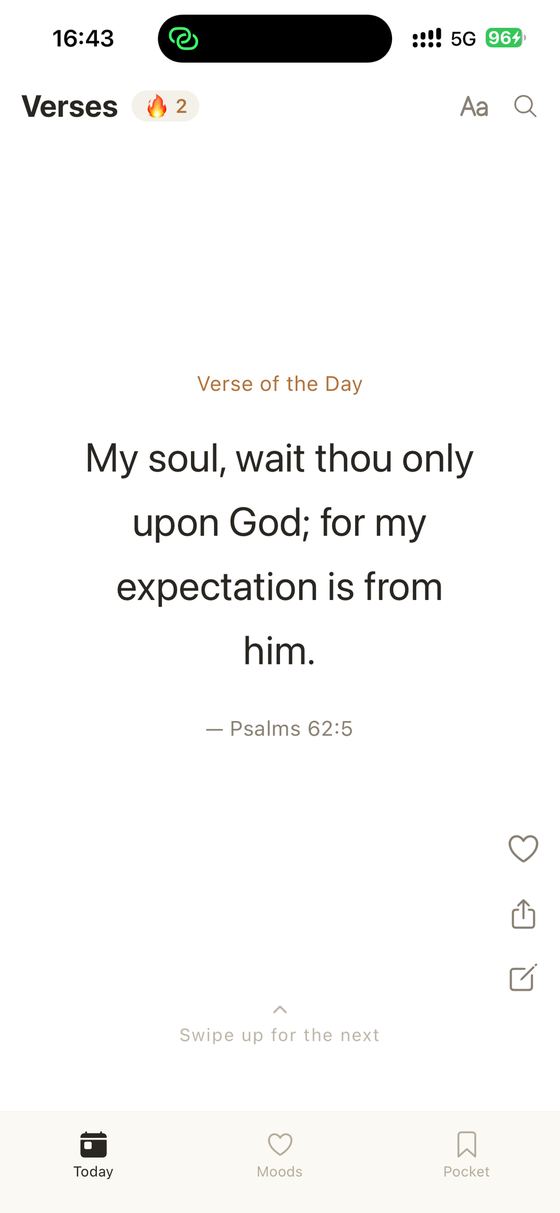
The verse of the day, the same one all day.
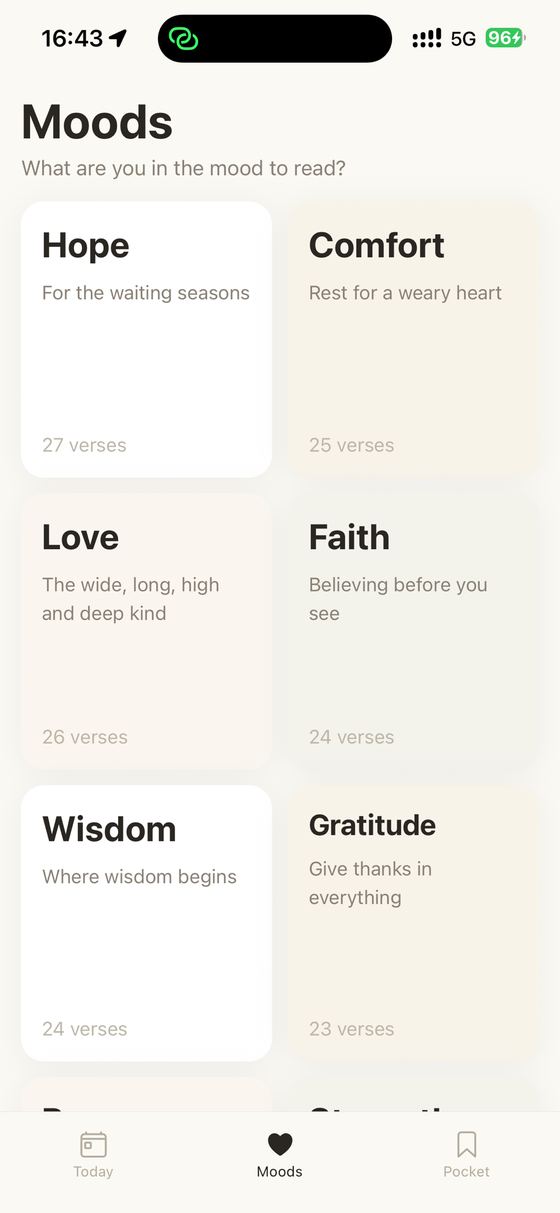
Moods, for when you do not know where to open.
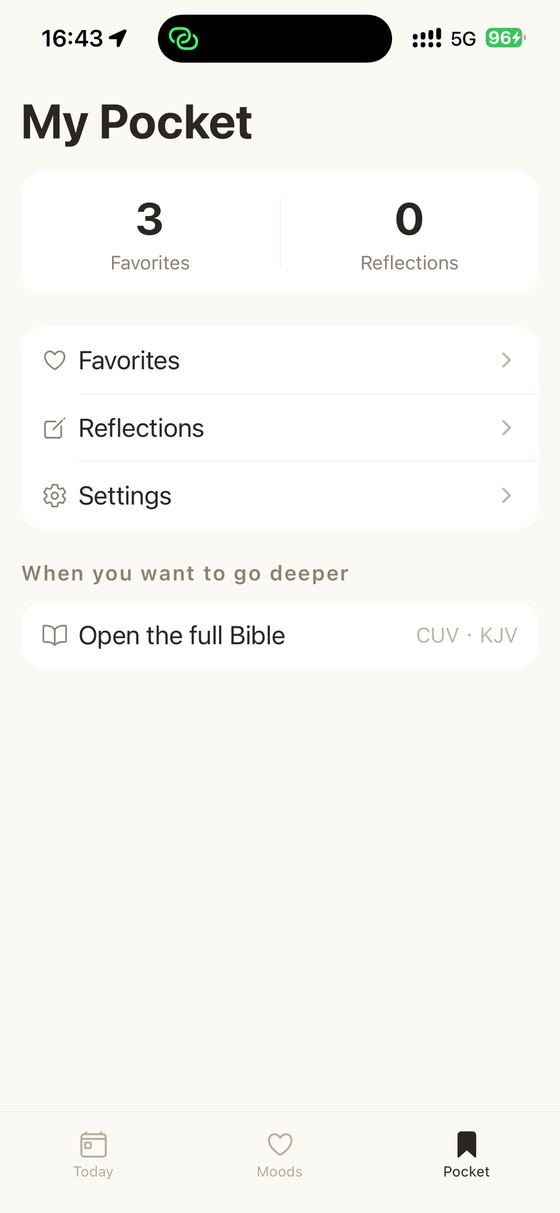
Favourites, notes, and the whole text behind them.
What you actually get
The text is in the app, not on a server
The entire Bible is compiled into a read-only database that ships inside the download and is unpacked once, the first time you open the app. Nothing is streamed, nothing is fetched chapter by chapter, and there is no "downloading translation" screen. The practical consequence is that the app has no bad days: no outage, no expired session, no spinner in a tunnel. It reads the same on a plane as it does on wifi, because to the app there is no difference between the two.
Three texts, and all of them are public domain
You get the King James Version, and the Chinese Union Version in both simplified and traditional characters. This is not an arbitrary selection — it is very close to the complete list of what a free app can legally bundle and hand out. The modern translations most people name first, the NIV and the ESV, are under copyright and licensed per-app for money, which is exactly why the apps that carry them tend to need an account. Choosing a text here is a single setting, applied everywhere at once.
A reader that gives you back the paragraph
Open a chapter and it renders as one continuous block of text, the way a page does, rather than as a stack of one-verse cards. Verse numbers are still there, set small ahead of each verse, so you can find a reference and cite one; but the sentences run into each other as they were written, and an argument that spans four verses reads as an argument rather than as four separate sayings. Previous and next chapter carry you across book boundaries, so the end of one book runs into the beginning of the next instead of dead-ending.
A daily verse that is the same all day
The verse of the day is derived from the date itself, not drawn at random each time you look. Close the app and reopen it an hour later and it is the same verse, so you can come back to it, and so it is the same one for anybody else reading in the same day. It is picked from a hand-assembled selection rather than uniformly from the whole text — a randomly chosen verse from anywhere in the Bible is very often a genealogy or a boundary description.
Search that admits what it is
Search looks for your words inside the scripture text you are currently reading, and shows you every verse containing them with the match highlighted. It is a substring search, deliberately: full-text indexes segment English into words well and Chinese poorly, and a search that quietly works better in one language than another is worse than a plain one that behaves the same in both. What it does not do is parse a reference — typing "John 3:16" searches for that as text and will not jump you there. To go to a reference, use the book list and the chapter grid.
Reading that is set the way you want to read
Verse size steps through several sizes, there are three typefaces including a Chinese brush-style face, and there are light and dark themes ranging from a warm paper white through sepia to a true black. Because the app pins itself to light and never reads the system appearance setting, dark reading is something you turn on deliberately rather than something that happens to you at sunset — which for a book people read in bed is arguably the right way round.
Favourites and notes that stay on the phone
Long-press a verse while reading and you can copy it with its reference attached, keep it, or write a note against it. Favourites and notes live in a local database on the device. There is no server holding them, which is the good news and also the catch — see the privacy section, where the trade-off is spelled out rather than glossed.
A verse card you can actually send
Any verse can be laid out as a card — background, typeface, arrangement — and exported as a real PNG through the standard iOS share sheet. It is a picture at that point, so it goes wherever you send it and nowhere else. Nothing is uploaded to produce it and no link back to the app is embedded in it.
The interface language is not the scripture language
These are two separate settings, deliberately. The interface speaks nine languages; the scripture text is chosen independently. A reader whose phone is in Japanese or Spanish can read the King James Version, and a reader who wants an English interface can read the Chinese Union Version. Most apps tie the two together and then make you fight the phone to separate them.
How the text gets onto your phone
A Bible app has an unusual build problem: the content is fixed, enormous by app standards, and has to be correct. Here is the pipeline that produces the file inside the download.
The sources are public-domain releasesThree texts are fetched once, at build time, on a developer machine: the King James Version, and the Chinese Union Version in simplified and in traditional characters. All three are old enough to be in the public domain, which is what makes it legal to compile them into a file and hand that file to everyone who installs the app.
They are compiled into one row per verseRather than three separate copies of the Bible, the build produces a single table with one row per verse holding all three texts side by side, plus a table of the sixty-six books carrying each book name in each language. That layout is why switching scripture language is instant and why it never loses your place: the row is the same row, only a different column is read.
The build refuses to ship a misalignmentThe script verifies that the simplified and traditional texts line up verse for verse, and that the English has no unexplained gaps. It tolerates exactly two, at 3 John 1:15 and Revelation 12:18, because those are genuine differences in how English and Chinese editions divide verses at those points rather than missing data. Anything else fails the build.
The result is a read-only database in the bundleThe output is a single SQLite file compiled into the app. It is never written to, so it cannot be corrupted by use, and it carries a version stamp — when the text is corrected, the stamp increments and the app replaces its copy on the next launch instead of leaving old readers on an old file.
First launch unpacks it, onceThe very first time you open the app it copies that file out of the bundle into its own storage, and from then on every lookup is a local database query. This is the only reason it can show you a chapter with the phone in airplane mode thirty seconds after installing.
One consequence worth stating plainly: because the text is bundled rather than downloaded, adding a scripture text means shipping an app update, and the download is meaningfully larger than an app that fetches chapters on demand. That is the trade being made — install size, once, in exchange for never needing the network again.
What leaves your phone
Nothing. Not "nothing important" — the app contains no code that makes a network request. There is no analytics SDK, no advertising SDK, no crash reporting, and no tracking identifier. The App Store privacy card and this paragraph say the same thing because there is nothing to reconcile.
There is no account and no sign-in, and no screen anywhere in the app asks for an email address. Internally, rows in the local database are keyed to a fixed placeholder string, purely so the tables have a column to key on. It is the same string on every device and it is never transmitted, because there is nowhere to transmit it to.
Your favourites, your notes, your settings and your reading history are stored on the device and nowhere else. The one URL the app knows how to open is handed to Safari when you tap a link in Settings, which is a browser opening a page, not the app reporting anything.
The honest catch: nothing is backed up and nothing is synced. Delete the app and your notes and favourites go with it, and a new phone starts empty. There is currently no export. If you have written something you would be sorry to lose, copy it somewhere else in the meantime — that is a real limitation of a purely local app and it would be dishonest to describe it as a feature.
Price
Free. Version 1 has no in-app purchases, no subscription, and no advertising of any kind — no banners, no interstitials between chapters, and no verse-of-the-day that is really an ad.
There is no paid tier withholding part of the text, either. The whole Bible is in the app you downloaded; there is no chapter behind a purchase, because the texts are public domain and there is no licence to recoup.
The King James Version, and the Chinese Union Version in both simplified and traditional characters. All are in the public domain, which is what allows a free app to bundle them and distribute them to everyone.
Why is the NIV or the ESV not included?
Both are under copyright. Bundling them would require a paid licence from the publisher, and those licences generally require the text to be served rather than shipped — which in turn is why apps carrying them usually need an account and a connection. A free offline app carries public-domain texts instead.
Does it work without an internet connection?
Yes, completely, including the first launch. The whole text is inside the download and the app makes no network requests at any point.
Do I have to create an account?
No. There is no sign-in screen and the app never asks for an email address or any other identifier.
Can I jump straight to a reference like John 3:16?
Not by typing it — search looks for your text inside the verses themselves, so typing a reference searches for it as words. Use the book list and then the chapter grid to go to a chapter, and the verse numbers in the reader to find the verse.
Are my notes and favourites backed up?
No. They are stored on the device only. There is no cloud sync, no account to attach them to, and no export yet, so deleting the app deletes them and a new phone starts empty.
Does the reader remember where I stopped?
Not currently. It opens where you navigate it, so if you are reading through a book it is worth noting the chapter you finished. Favouriting the last verse you read is the workable habit until this exists.
Is it tied to a particular church or denomination?
No. It ships the texts and gets out of the way. There is no commentary, no study notes, no devotional written around the verses, and nothing that argues a reading of them.